3D partitioned heat conduction
Setup
We solve a partitioned heat equation. For information on the two dimensional non-partitioned case, please refer to [1, p.37ff]. In this tutorial the computational domain is partitioned and coupled via preCICE. The coupling roughly follows the approach described in [2].

The computational domain can be seen in the picture above. To get a better overview of the domain, the domains of the participants are translated. The domain of the Neumann participant is the small box, and the Dirichlet participant’s domain is the rest. In the simulation, the small box is fully contained in the Dirichlet domain. This means, the coupling interface consists of five sides of the box.
Configuration
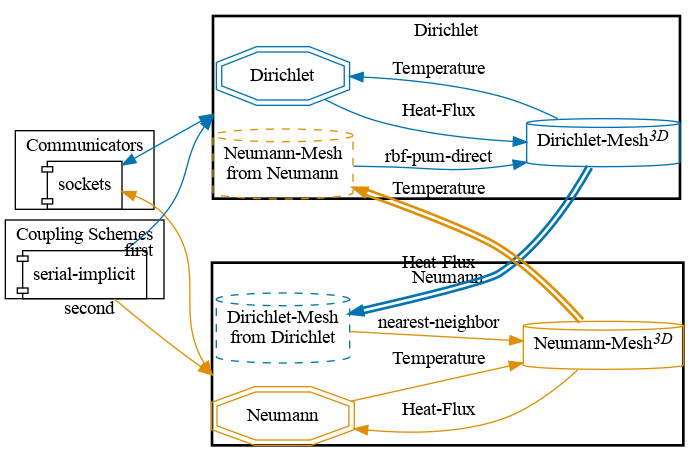
preCICE configuration (image generated using the precice-config-visualizer):
Available solvers and dependencies
You can either couple a solver with itself or different solvers with each other. In any case you will need to have preCICE and the python bindings installed on your system.
- FEniCSx. Install FEniCS and the FEniCSx-adapter. The code is adapted from the existing fenics-tutorial from [1].
Running the simulation
You can find the corresponding run.sh script for running the case in the folders corresponding to the participant you want to use:
cd dirichlet-fenicsx
./run.sh
and
cd neumann-fenicsx
./run.sh
Visualization
Output is written into the folders of the FEniCSx solvers (neumann-fenicsx/output-neumann.bp and dirichlet-fenicsx/output-dirichlet.bp).
It is sufficient to import the folders to ParaView to get the visualization of the simulation.
References
[1] Hans Petter Langtangen and Anders Logg. “Solving PDEs in Minutes-The FEniCS Tutorial Volume I.” (2016). pdf