Partitioned heat conduction (direct access setup)
This tutorial is a modified version of the “partitioned heat conduction” tutorial showcasing direct mesh access.
Note:
Get the case files of this tutorial, as continuously rendered here, or see the latest released version (if there is already one). Read how in the tutorials introduction.
Setup
This case is a modified version of the partitioned heat conduction tutorial. Main modification is that we here use the direct mesh access feature to let the solvers compute the data mapping and not preCICE.
Further minor modifications:
- We use a parallel coupling scheme instead of a serial one to prevent running into the problem where we are trying to add a zero column to the quasi-Newton matrix. For serial coupling, this happens here because one data field converges much faster than the other.
Configuration
preCICE configuration (image generated using the precice-config-visualizer):
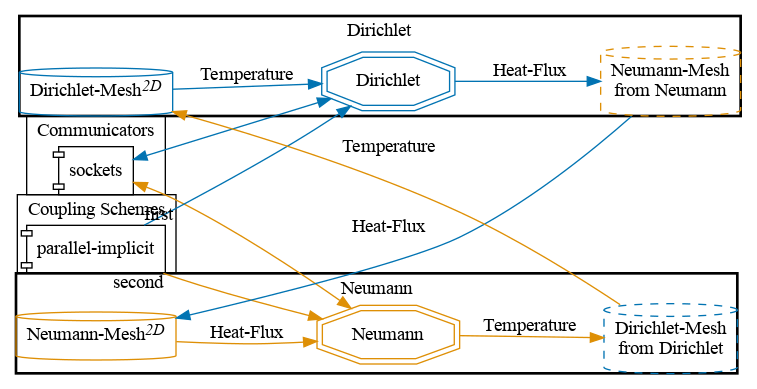
The data mapping is computed by directly sampling the FEM function representation at the inquired locations.
Available solvers
You can either couple a solver with itself or different solvers with each other. Available solvers:
-
Nutils. For more information, have a look at the Nutils adapter documentation.
-
G+Smo. Install the G+Smo adapter.
Running the simulation
Open two terminals and run:
cd neumann-nutils
./run.sh
and
cd dirichlet-nutils
./run.sh
See the partitioned heat conduction tutorial.