Turek Hron FSI3
Setup
The setup is shown schematically here:
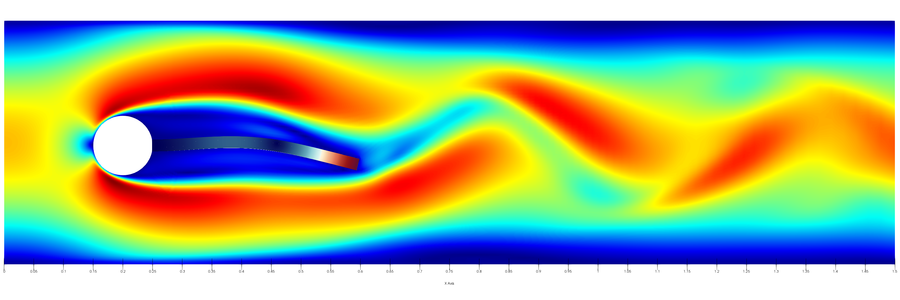
For more information please refer to the original publication of the benchmark [1].
Configuration
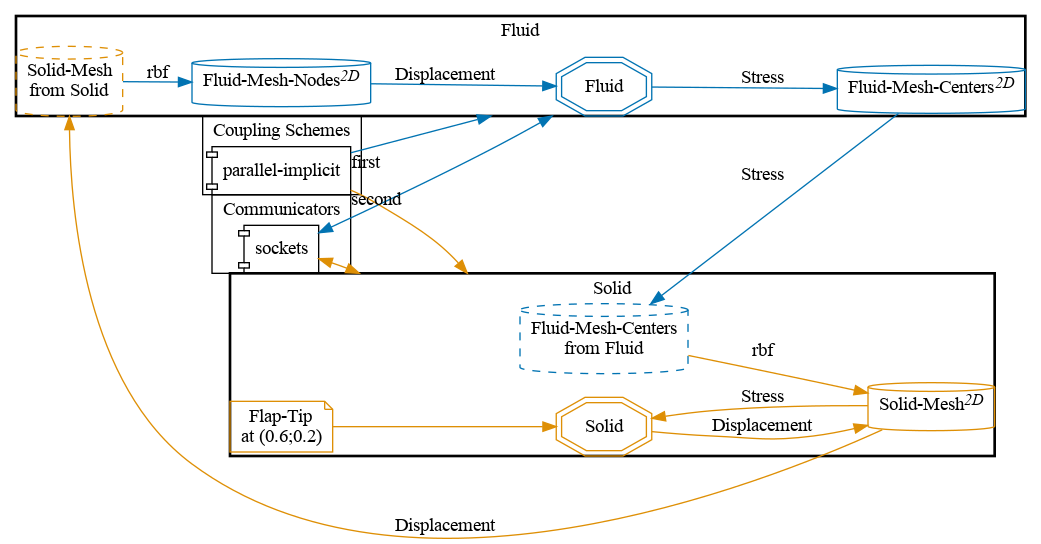
preCICE configuration (image generated using the precice-config-visualizer ):
Available solvers
Fluid participant:
- OpenFOAM (pimpleFoam). For more information, have a look at the OpenFOAM adapter documentation .
- Nutils. For more information, have a look at the Nutils adapter documentation . This case takes significantly longer to run than the OpenFOAM case, see related issue .
Solid participant:
- deal.II. For more information, have a look at the deal.II adapter documentation
. This tutorial requires the nonlinear solid solver. Please copy the nonlinear solver executable to the
solid-dealiifolder or make it discoverable at runtime and update thesolid-dealii/run.shscript. - Nutils. For more information, have a look at the Nutils adapter documentation .
Running the Simulation
Open two separate terminals and start each participant by calling the respective run script. For example:
cd fluid-openfoam
./run.sh
and
cd solid-dealii
./run.sh
You can also run OpenFOAM in parallel by ./run.sh -parallel. The default setting here uses 25 MPI ranks. You can change this setting in fluid-openfoam/system/decomposeParDict.
You may adjust the end time in the precice-config.xml, or interrupt the execution earlier if you want.
In the first few timesteps, many coupling iterations are required for convergence. Don’t lose hope, things get better quickly.
Post-processing
You can visualize the results of the coupled simulation using e.g. ParaView. OpenFOAM uses an OpenFOAM-specific format, and you can directly load the (empty) file fluid-openfoam.foam in Paraview or convert the results to VTK with foamToVTK. deal.II writes VTK files. Both Nutils solvers currently do not write VTK files (but use their own in-situ visualization), but this can be easily added similarly to the perpendicular flap solvers
.
If you want to visualize both domains with ParaView, keep in mind that the different solvers may write results with different output frequencies, which you might want to synchronize .
There is a known issue
that leads to additional “empty” result directories when running with some OpenFOAM versions, leading to inconveniences during post-processing. At the end of run.sh, we call openfoam_remove_empty_dirs (provided by tools/openfoam-remove-empty-dirs) to delete the additional files before importing the results in ParaView.
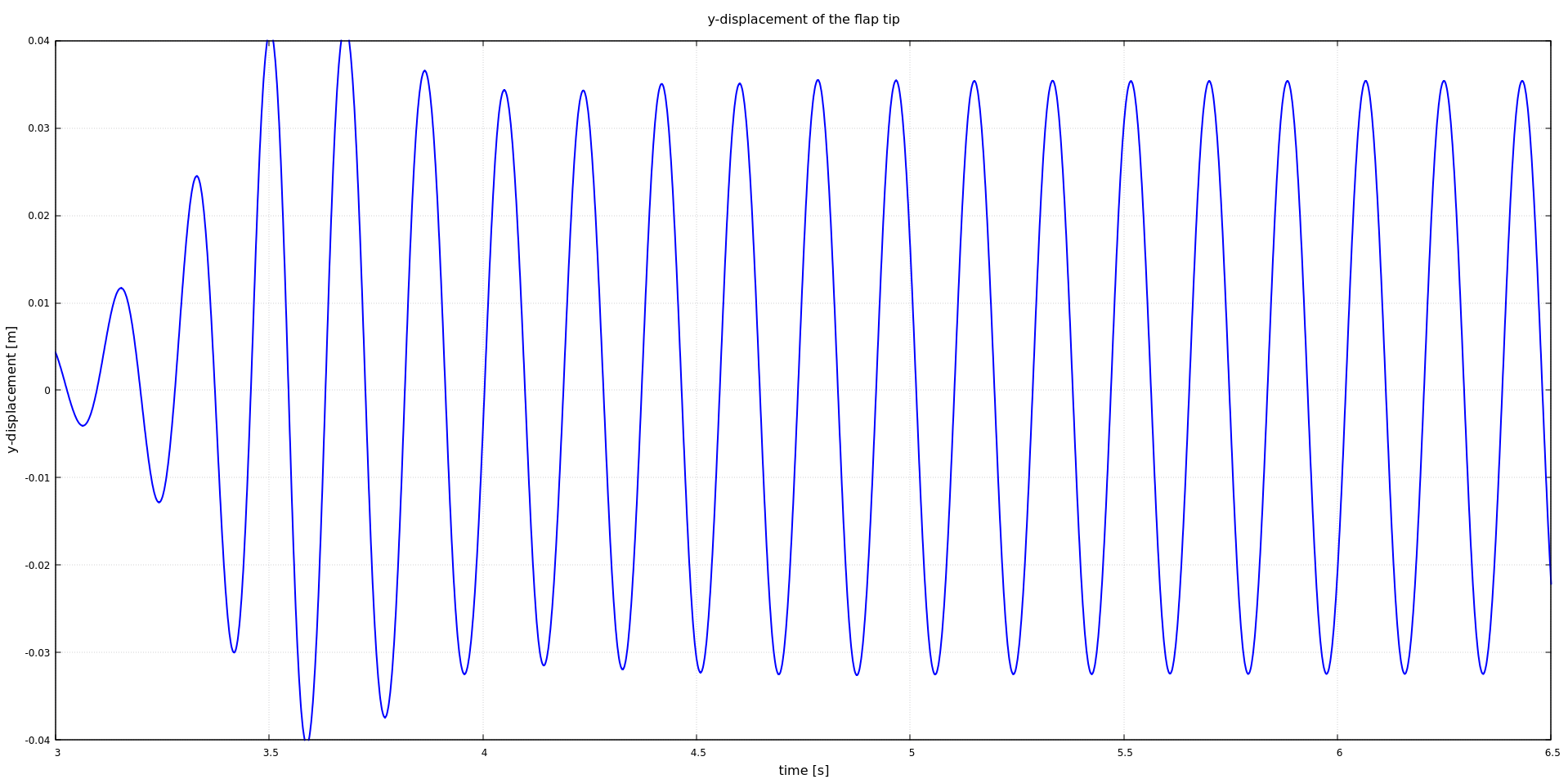
Moreover, as we defined a watchpoint at the flap tip (see precice-config.xml), we can plot it with gnuplot using the script plot-displacement.sh, which expects the directory of the selected solid participant as a command line argument. For example:
plot-displacement.sh solid-dealii
Before running the simulation again, you may want to cleanup any result files using the script `clean-tutorial.sh`.
## Mesh refinement
In `fluid-openfoam/system/`, we provide three different fluid meshes:
* `blockMeshDict`: the default mesh with approximately 21k cells,
* `blockMeshDict_refined`: a refined mesh with approximately 38k cells,
* `blockMeshDict_double_refined`: a refined mesh with approximately 46k cells.
If you want to use one of the two refined meshes, simply swap the `blockMeshDict`:
```bash
mv blockMeshDict blockMeshDict_original
mv blockMeshDict_refined blockMeshDict
Acknowledgements
Thanks to the Technical University of Eindhoven for funding the development of the Nutils participants for this tutorial.
References
[1] S. Turek, J. Hron, M. Madlik, M. Razzaq, H. Wobker, and J. Acker. Numerical simulation and benchmarking of a monolithic multigrid solver for fluid-structure interaction problems with application to hemodynamics. In H.-J. Bungartz, M. Mehl, and M. Schäfer, editors, Fluid Structure Interaction II: Modelling, Simulation, Optimization, page 432. Springer Berlin Heidelberg, 2010.