Partitioned heat conduction (direct access setup)
This tutorial is a modified version of the “partitioned heat conduction” tutorial showcasing direct mesh access.
Note: Get the case files of this tutorial
, as continuously rendered here, or see the latest released version
(if there is already one). Read how in the tutorials introduction
.
Setup
This case is a modified version of the partitioned heat conduction tutorial . Main modification is that we here use the direct mesh access feature to let the solvers compute the data mapping and not preCICE.
Further minor modifications:
- We use a parallel coupling scheme instead of a serial one to prevent running into the problem where we are trying to add a zero column to the quasi-Newton matrix. For serial coupling, this happens here because one data field converges much faster than the other.
Configuration
preCICE configuration (image generated using the precice-config-visualizer ):
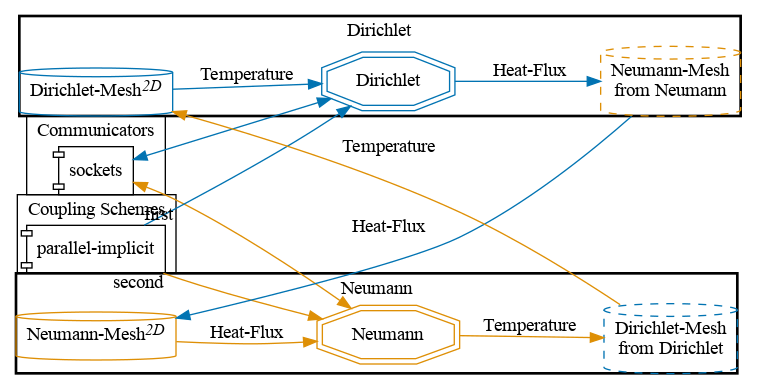
The data mapping is computed by directly sampling the FEM function representation at the inquired locations.
Available solvers
You can either couple a solver with itself or different solvers with each other. Available solvers:
Nutils. For more information, have a look at the Nutils adapter documentation .
G+Smo. Install the G+Smo adapter .
Running the simulation
Open two terminals and run:
cd neumann-nutils
./run.sh
and
cd dirichlet-nutils
./run.sh
See the partitioned heat conduction tutorial .